What to do if your Merchant Center account is suspended
Undoubtedly, Google Merchant Center is a crucial tool for effective retail advertising campaigns. The service displays products directly to interested consumers, significantly increasing the number of purchases and, consequently, the advertiser’s profit. To use the service, all products need to be uploaded directly to Google, after which they can be displayed in Google Product Ads, Google Shopping, and Commerce Search.
Looks simply? Why not. Before uploading and placing data on its platforms, Google meticulously checks them for compliance with set standards. If even the slightest detail is unsatisfactory, the account is suspended. So today, let’s talk about how to unblock an account in GMC. This information will be useful not only to those who have already encountered this problem but also to those who are registering an account and setting up one.
Common reasons for Merchant Center suspension
There are four types of suspensions – suspension of the Google Merchant Center account itself, the ad account, the user block, or the domain block. The reason for the suspension is a violation of the rules, so the main task is to understand what exactly was violated and how to fix the situation. The Merchant Center policy on advertising can be broadly divided into four areas:
- Prohibited content.
The ban applies to dangerous, counterfeit, and fake products that violate intellectual property rights, are provocative, contain unacceptable content, or are unlicensed. This concerns not only products but also advertising methods. Pay close attention to the compliance and completeness of the information in the feed. - Policy violations.
Google Ads has a substantial list of products that are prohibited from being sold. Restrictions may vary depending on the country of sale and government regulations. For example, in Ukraine, advertising alcohol, weapons, medical drugs, gambling, adult content, and hazardous food (high fat, sugar, salt content) is prohibited. - Prohibited practices.
Google strives to protect sellers from shady, dishonest sales methods, and buyers from misuse of their personal data and fraud. Therefore, strict requirements are imposed on the accuracy of purchase condition data, information security, blocking harmful content, and resources without unique value. When paying for advertising, do not use suspicious cards, stolen, or invalid ones – this may be considered fraud. - Technical and editorial requirements.
Google has a substantial list of such requirements that advertisers must comply with. These include the correct display of the resource URL, compliance with the landing page, the ability to return “back” when following the link, requirements for the use of special characters, symbols in texts, domains, and more.

How does Google check sites?
 Google Merchant Center checks sites in three different ways: automatically through search bots, manually by service moderators, and manually by support staff. The most common and the first method is the automatic check by bots, which pretend to be regular users. In Analytics, you can see that they stay on the site for 0 seconds and do not scroll. Their task is to check the resource for compliance with the standards, and if they find an error, they flag it. If there are more flags than allowed, the Merchant account gets suspended.
Bots start working as soon as you register an account and upload the feed. They find the simplest issues – an inaccessible or error page, a page with a virus, language mismatches, errors, strange symbols, lack of images, missing product information, and so on.
Since bots are not all-powerful, the next stage is manual verification. Moderators, who are often hired in countries like India, Vietnam, the Philippines, Pakistan, and Poland, take over. It’s evident that they do not know Ukrainian or Russian and are not familiar with the specifics of delivery by Nova Poshta or Ukrposhta. Therefore, it is the advertiser’s task to ensure that the information is easy to find, understand, and access. Moderators manually try to place orders, pay online, etc.
If your account is suspended, moderators conduct a particularly thorough check the first time after you appeal. If you click the button indicating you have corrected the errors without actually fixing them, meaning your Google Shopping settings or your site still contain the previous errors, then next time they will scrutinize your account even more closely, even if everything seems perfect.
If you feel you have been treated unfairly, contact Google Ads support. This is the highest level; they handle all complaints but cannot unblock Google Merchant accounts. Only moderators can do that. The support team is located closer to your region and communicates in your language, but their help can be very slow. If the complaint is justified, they will send you back to the moderator out of turn, which may help with unblocking. However, if they see that you are trying to trick the system by making minor corrections each time, leaving some inaccuracies, they will take it very poorly.
What to check and fix first
Having understood the verification methods and reasons for suspension, it is time to delve into the cases where you should pay the most attention and what to fix first. Advertisers often violate the following Google rules.
- Non-compliant products.
Intellectual property protection and product licensing are paramount. Do not attempt to advertise counterfeits, copies of well-known brands, or clearly counterfeit products. Also, familiarize yourself with the rules to exclude all prohibited items from your catalog (alcohol, tobacco products, medicines, weapons, explosives, adult products, gambling, legal or financial services, etc.).
- Payment.
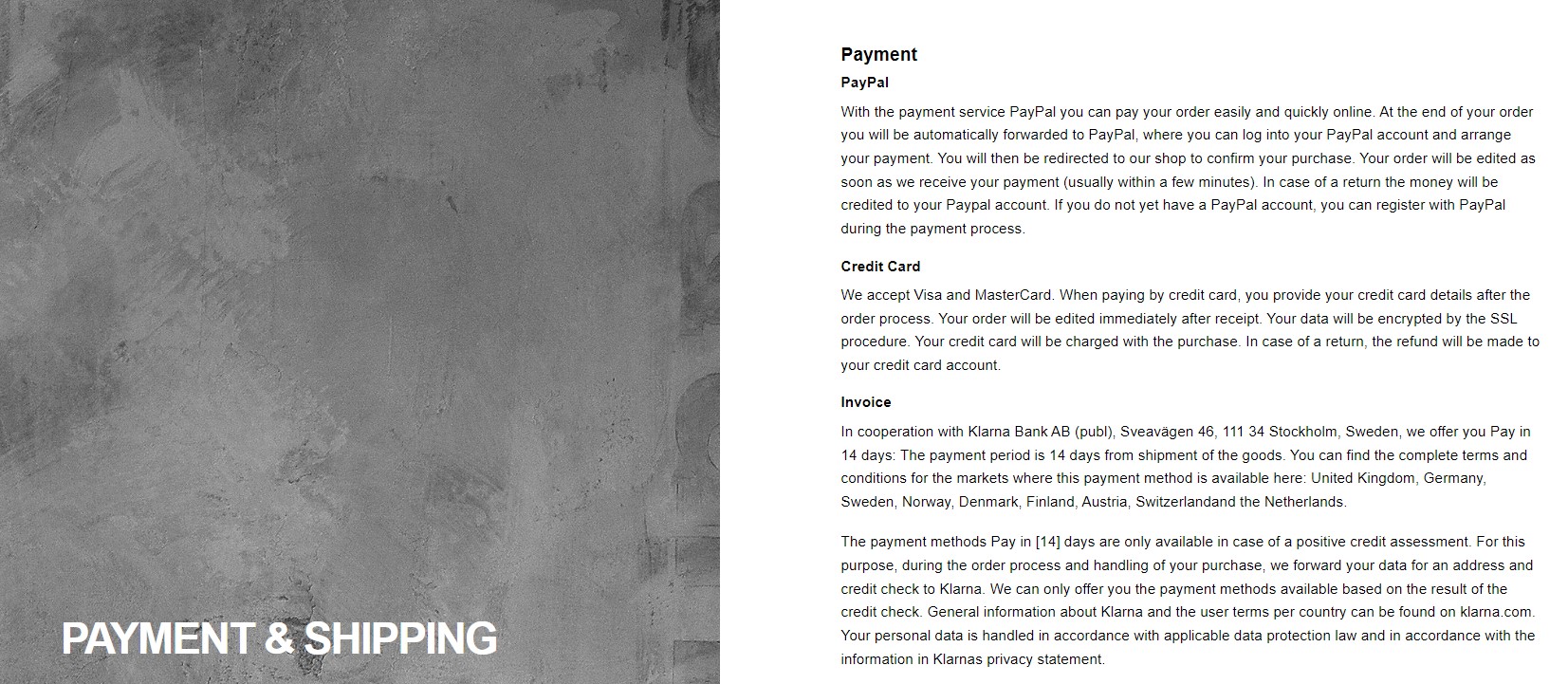
Detailed information about payment methods must be specified, and online payment is mandatory. Customers must be able to pay for the product without making any calls or requiring assistance from a manager. Therefore, integrate a system like Liqpay or WayForPay, or other online payment services that should be available for all delivery methods. Information about various payment methods should also be on the “Shipping and Payment” page.
Google employees do not understand why some sellers want to receive payment via card number or partial payment; they cannot grasp the desire to save 1.5-2% commission from the payment system. They want to see VAT included in the payment without any additional fees or charges. Everything should be as transparent as possible. Payment method details should be specified in the “Payment” section and on the order page. Also, include the logos of the payment systems used in the footer.
- Shipping.
This is another area where there is a high chance of getting blocked. There should be a separate “Shipping” or “Shipping and Payment” section where you clearly state the possibility of “door-to-door delivery” – by courier of Ukrposhta, Meest, or Nova Poshta, but to the door, across Ukraine, to the customer’s address. Do not mention delivery restrictions to Crimea or other temporarily occupied territories, as bots simply do not understand this. It is advisable to specify delivery times, the duration of order processing, and shipping costs (at least an average cost).
The most important thing is that all the information specified in GMC, on the site in the “Shipping” section, and on the order page should be the same. Before unblocking Google Merchant, be sure to check the accuracy of the payment and shipping information – this is the most common reason for blocking. - Returns.
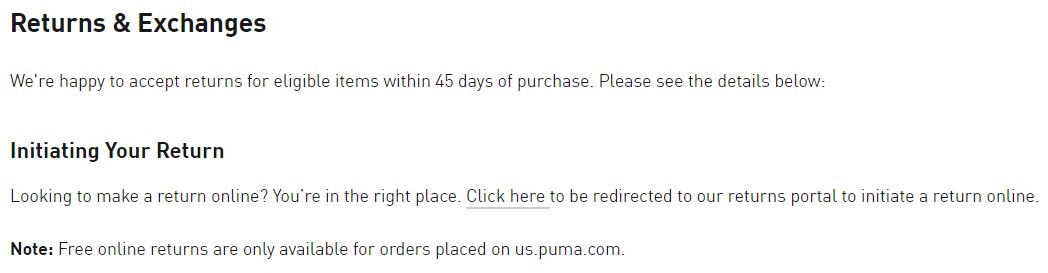
A “Returns and Exchanges” or simply “Returns” section is mandatory, where detailed information about the possibility of returning the order is provided. This includes a description of the return procedure, duplicate phone numbers, feedback forms, methods of returning money, terms, etc. Everything must be in accordance with the laws, so if a product is non-returnable, this should be clearly stated, with references to relevant laws.
- Contacts.
The appropriate section should contain information with the company’s real address. If there are multiple addresses, list them all; if none, specify the address where your sole proprietorship or LLC is registered. A phone number, email, and store hours are mandatory. Repeat this information in the footer and header. A feedback form is desirable. Check if there are any bad reviews about your phone number online – this will be a significant drawback.
- Privacy policy.
Another mandatory section where you need to clearly and transparently state how the site collects customer data. Specify the trackers used – Google Analytics, Meta Pixel, and when they operate. - Product cards.
Strict requirements are imposed on product listings. Only two statuses are possible: “in stock” and “out of stock.” Detailed product information, high-quality images, correct names, and preferably reviews (which reduce the likelihood of a block) should be provided. Information about shipping and payment should also be included. The price must be the same in the catalog, feed, and during checkout. If you have a promotion, specify the duration and geography of the promotion. - Duplicate Google Merchant Center accounts.
The system verifies the site for one domain, so do not create additional profiles. If you have already registered an account with one email and it is blocked, a new one will also be blocked.
If you receive a suspension, the request for unblocking is considered within 7 days. The option to resubmit for review will be available again in 7 days. If you receive more than 10 rejections, it is better to create a new account in Merchant Center, but with a new email.
Thus, the question of how to unblock Google Merchant is not simple and requires a detailed analysis of the resource and all submitted information. Ensure that all data matches what you submitted in Merchant Center.
Remember, Google trusts you at first, but with each new submission, the trust credit decreases, making appeals more difficult. It might be better to seek professional help.